
Collection software for firearms, coins, stamps, knives, Japanese swords, geological specimens & more - offline - no cloud risks - Windows, Mac, Linux, iOS, and Android.
Try full features Free for 30 Days - No Credit Card. After 30 days you can upgrade or continue to use free version.
User manual › Features Available Through the Menu
Reports Menu
Note: These are not available in mobile apps.
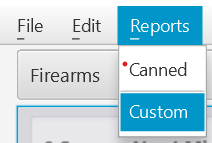
Figure 19 Reports
Selecting the Reports menu option will allow you to select Canned or Custom Reports (discussed earlier).
Backup Database Menu
Notes:
- Backup Database is not available in mobile apps. Use Data Transfer instead.
- Backup Database does not backup pictures. If you want to backup both your database and pictures use the "Export > To Data Transfer" feature instead.
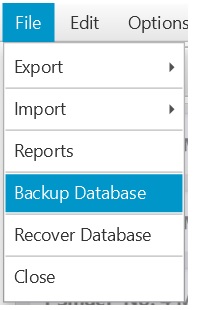
Figure 20 Backup Database
Selecting this menu option will save the database to a location that you specify. There is also an automatic backup that happens whenever you start the program. This automatic backup can be disabled in the [File > Options] menu.
← Import Menu | Contents | Recover Database Menu →
Part of the NM Collector CP 2.3 user manual. Download the full manual (PDF).