
Collection software for firearms, coins, stamps, knives, Japanese swords, geological specimens & more - offline - no cloud risks - Windows, Mac, Linux, iOS, and Android.
Try full features Free for 30 Days - No Credit Card. After 30 days you can upgrade or continue to use free version.
User manual › Features Available Through the Menu
Recover Database Menu
Note: Recover Database is not available in mobile apps. Use Data Transfer instead.
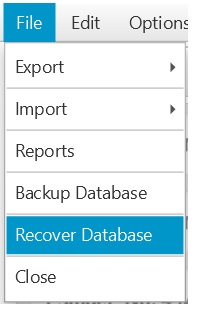
Figure 21 Recover Database
Selecting this menu option will allow you to navigate to a location where a database backup is stored so you can recover to that database. The default location that opens is where the automatic backups are stored. You can select the backup you want based on the date and time when the backup was saved. You can also navigate to a different location if you manually saved a backup. The database you select will replace your current data so choose wisely.
Note: The program will shut itself down after recovery.
← Reports Menu | Contents | Clear Database Menu →
Part of the NM Collector CP 2.3 user manual. Download the full manual (PDF).