
Collection software for firearms, coins, stamps, knives, Japanese swords, geological specimens & more - offline - no cloud risks - Windows, Mac, Linux, iOS, and Android.
Try full features Free for 30 Days - No Credit Card. After 30 days you can upgrade or continue to use free version.
Maintenance Page
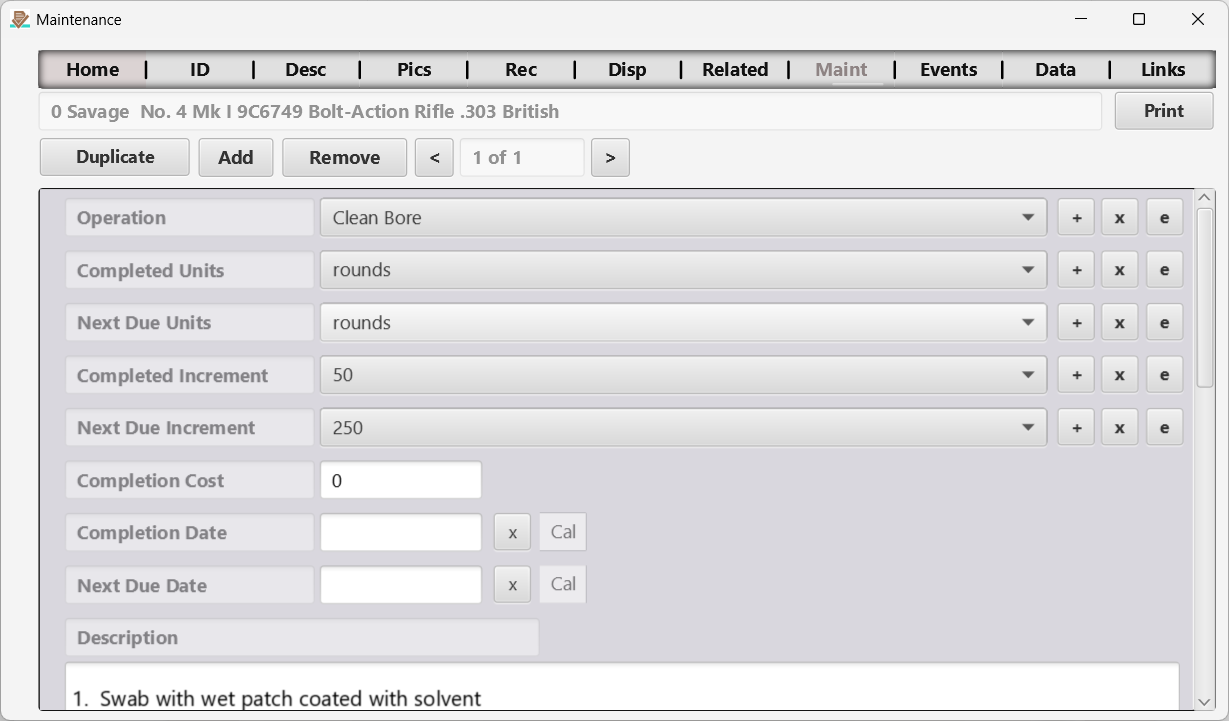
Figure 12 The Maintenance page.
Capture one or more maintenance tasks and associated data for the selected item.
Text/drop-down fields use autocomplete on desktop and searchable pickers on mobile. Select the maintenance record first, then edit its fields. Saving updates only that record; returning from the mobile picker keeps the current maintenance record selected.
Duplicate (Maintenance) Button
Use the duplicate button when you want to complete a maintenance operation. That way you do not have to re-create previously defined maintenance operations each time you repeat them.
Add (Maintenance) Button
This allows you to add a new maintenance operation with detailed tasks. Once entered the duplicate button described above can be used to capture every time the maintenance is performed.
Remove (Maintenance) Button
This will delete the current maintenance operation.
Maintenance Scroll Bar
You can scroll through maintenance records using the “<” and “>” buttons located on either side of the current maintenance record field which shows up as a number representing the current maintenance record “of” a number representing the total number of maintenance records. Maintenance records are stored in reverse chronological order so the most recent records are displayed first.
← Add Related Item Page | Contents | Events Page →
Part of the NM Collector CP 2.3 user manual. Download the full manual (PDF).