
Collection software for firearms, coins, stamps, knives, Japanese swords, geological specimens & more - offline - no cloud risks - Windows, Mac, Linux, iOS, and Android.
Try full features Free for 30 Days - No Credit Card. After 30 days you can upgrade or continue to use free version.
Main Page
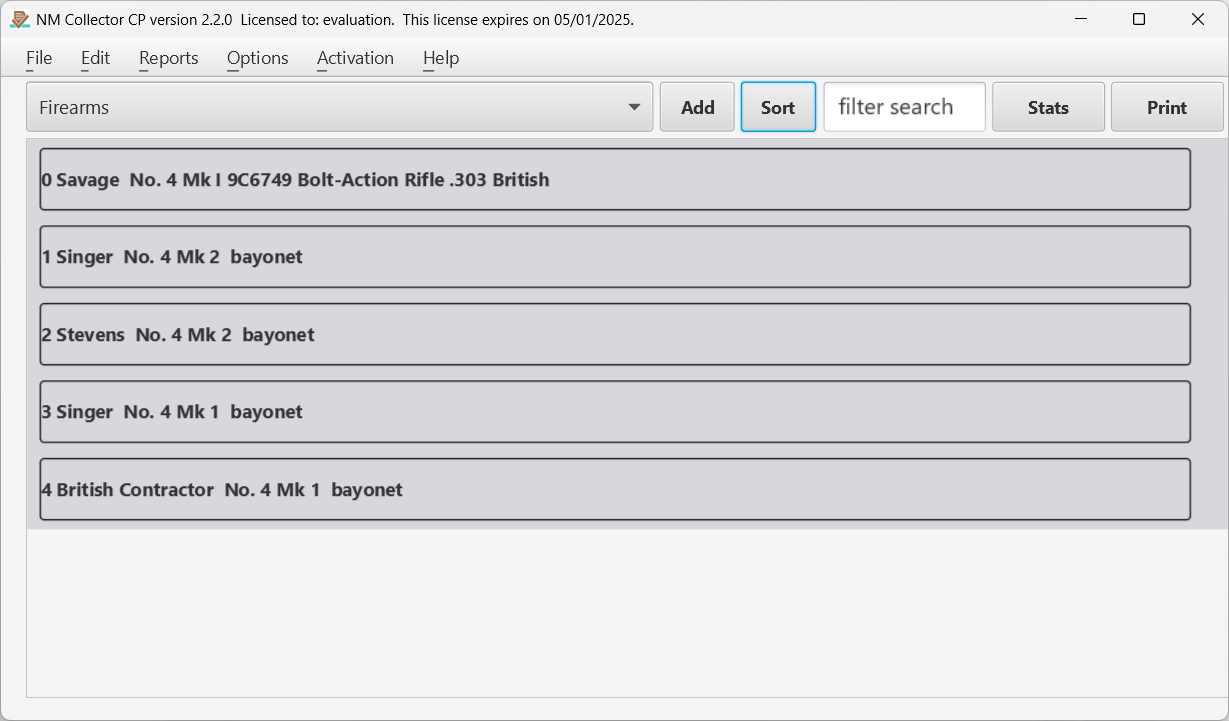
Figure 1 The Main page of the application where items are listed.
This page is the center of control of the application. The collection is selected from the drop down and items for that collection are listed on the page. Clicking on an item in the list will take you to the data for that item.
Title Bar
The title bar contains the name of the application, the current version you are running, and the subscription (activation) expiration date.
Menu Bar
The menu bar gives you access to reports, file functions, edit features, options, activation (subscription), and help.
Collection Drop Down
The collection drop down contains a list of the available collections. Selecting a collection loads the template for that collection and the list of items in that collection.
Add (Item) Button
This button adds a new item to the selected collection and opens the identification tab for you to enter key values for identifying this new item .
Sort (Item) Button
This will change the sort order of the items displayed between ascending and descending.
Filter (Search) Field
Enter values in this field to filter what items are displayed. Only items that match the filter will be displayed. Click the check mark displayed in the field or hit return to apply the filter. Click the X displayed in the field to clear the filter.
Stats Button
Clicking this button will open the statistics page where data is displayed in a table format and summaries are calculated. Please see the statistics description below.
Print Button
This button opens a printable report containing the currently listed items. If the list is filtered then only those filtered items will show up in the report.
List of Items
The rest of the page consists of a list of items in the collection. Clicking on an item in the list takes you to the Identification (ID) tab for that item. Other tabs also become available. Each of these tabs is covered below.
← Operation | Contents | Statistics Page →
Part of the NM Collector CP 2.3 user manual. Download the full manual (PDF).